

Size
149.32 MB
Android
9.0+
Downloads
567
Security Scan
Verified Safe
✓ Scanned with ClamAV, APKiD, and Quark-Engine
Screenshots
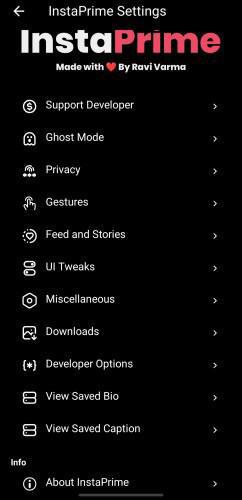
What's New
— Updated base version 402.0.0.49.70
~ Updated unclone icon and name to stock instagram
~ View Once Media Downloader (DMs) — Now you can save "View Once" photos and videos directly from your chats! (Just turn on Anti-View Once first to use this feature.)
~ Hide Filter Notifications Icon — You can now hide the Filter Bell Icon in DMs to keep your screen clean and simple. (Go to InstaPrime Settings → UI Tweaks → Hide Filter Notifications Icon.)
~ Improvements:
• Better Look & Feel — Small changes in design make InstaPrime look smoother and easier to use.
~ Faster Performance — The app now opens and runs faster than before!
~ Fixes:
• iOS Emojis now work everywhere — in posts, comments, reels, and chats.
• Anti-View Once is fixed and works perfectly now.
• Double Tap to Like (Post) option fixed and works properly.
• Small UI glitches and design issues removed.
• App crashes fixed — now more stable and smooth!
Description
Instaprime v4.1 (Instagram MOD v402.0.0.49.70) CLONE Version
InstaPrime — ALL THESE FEATURES BELOW ARE ON THIS MOD !!!
Features--
• Ghost Modes
— Secret View Story
— Secret Read Messages
— Secret Typing...
— Secret View Live Stream
— Secret Screenshot
— Listen Voice Note Secretly
— Anti-Reply Image
— Anti-View Once
— Anti-Replay Photo/Video Secretly
— Hide Media in Chats
• Privacy
— Disable Ads
— Disable Analytics Tracker
• Gestures
— Disable Reels Scrolling
— Disable Accidental Swipe-to-Refresh on Reels
— Disable Double Tap to Like (Posts, Comments, Reels)
— Disable Swipe to Navigate
• Feed & Stories
— Copy Caption Without Hashtags
— Repost with Caption in WhatsApp
— Disable Comment Options
— Disable Split Video in WhatsApp
— Disable Auto Play Next Story
— Force to Play Sound in Stories
— Disable Auto Play Video
— Enhance Story Upload Quality
— Enhance Photo Quality
• UI Tweaks
— Set Background Image in Chats
— Set iOS Emojis Across App
— Set Custom Font Across App
— Dark & Light Mode
— Option to Hide All Home Icons
— Option to Disable Suggested Reels
• Miscellaneous
— Change Translator Language
— Change Split Video Duration
— Disable “Follows You” Indicator
— Disable Hidden Mention Indicator
— Remove “…more” from User Bio
• Downloads
— Change Download Path
— Split Media by Username
— Show Notification on Download
• Developer Options
— Import Developer Settings
— Export Edited Developer Settings
— Enable / Disable Developer Options
— Reset Developer Setting
• Comment Options
— Copy Comments
— Translate Comments
— View Profile
— Copy Username
• User Profile Options
— Copy Bio
— View & Download Profile Picture
— Save Bio
— Translate Bio
— Copy Links & Username from Bio
• Extra Utilities
— View Saved Bio
— View Saved Captions
— Long Video Splitter (Auto cuts long videos into story-sized parts)
— See “Follows You” Indicator
— See Hidden Mentions with Indicator
— Download All Media (Posts, Highlights, Reels, Stories, etc.)
— Repost as IG Post / IG Story / WhatsApp Story
— Copy, Save, and Translate Captions & Hashtags
Rate this app
Ratings & Reviews
Pete Bellis & Tommy11/7/2025