
345.67 MB
Android 6.0+
23
arm64-v8a
Verified safeScanned with ClamAV, APKiD, and Quark-Engine. No threats detected.
Screenshots
What's New
unlocked
Description
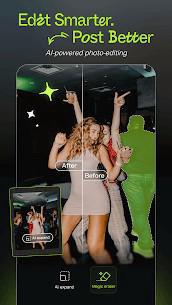
Hypic MOD APK is a powerful and intuitive picture editing app designed to help users enhance their photos with ease. Packed with a wide range of features, Hypic offers a user-friendly interface and a variety of tools to transform your images into stunning works of art.
Key Features of Hypic MOD APK
1. Glowing Skin
One of the standout features of Hypic is its ability to create flawless skin with just a few taps. The app’s advanced algorithms can smooth out imperfections, reduce blemishes, and give your skin a natural, radiant glow.
2. Natural Shape
Hypic empowers you to refine and enhance your facial features without compromising your natural beauty. With precise controls, you can adjust your eyes, nose, lips, and more to achieve your desired look.
3. Sculpt Face
Say goodbye to flat features and hello to a more sculpted appearance. Hypic offers a variety of tools to add definition to your face, giving it a more contoured and three-dimensional look.
4. Aesthetic Filters
Apply a wide range of filters to instantly transform your photos. From vintage and retro effects to modern and trendy styles, Hypic has something to suit every taste.
5. All-Encompassing Tool
Hypic is more than just a filter app. It’s a comprehensive picture editing tool that offers a variety of features, including:
Basic editing tools: Crop, rotate, and flip your images to adjust their composition and orientation. Crop your photos to remove unwanted elements or focus on specific areas. Rotate your images to correct any tilt or achieve a specific effect. Flip your images horizontally or vertically to create a mirror image or achieve a unique perspective.
Advanced editing tools: Adjust brightness, contrast, saturation, and more to fine-tune the overall appearance of your photos. Brighten or darken your images to control their overall exposure. Adjust the contrast to enhance the difference between light and dark areas. Adjust the saturation to control the intensity of colors.
Creative editing tools: Add text and stickers to personalize your photos and express your creativity. Add text to your photos to convey messages, captions, or quotes. Choose from a variety of fonts and styles to match your desired aesthetic. Add stickers to your photos to decorate, add humor, or convey emotions. Select from a wide range of stickers to suit different themes and occasions.
Drawing and painting tools: Unleash your creativity with drawing and painting tools.
Rate this app
Ratings & reviews
No reviews yet.