Download Appteka (works without ads)

Appteka is a community-driven, free Android apps market

Amaze Browser TV

Amaze Browser TV  icon

Amaze Browser TV

270 downloads

Screenshot Screenshot Screenshot Screenshot Screenshot
Uploaded by
Tremendo23
Version
2.0.5 (build 12) 
Size
4.8 MiB
Publish Date
2025-06-12
Category
TV
Package
com.sibimobilelab.amazebrowses
Minimum OS
Android 4.4
SHA1
3ccab5843d76eb565a278c311b8ac474fa0ba962
Security
Verdict: Safe
ClamAV: Clean (scanned 4991541 bytes)
Description
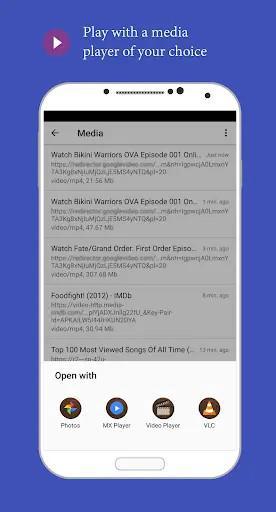
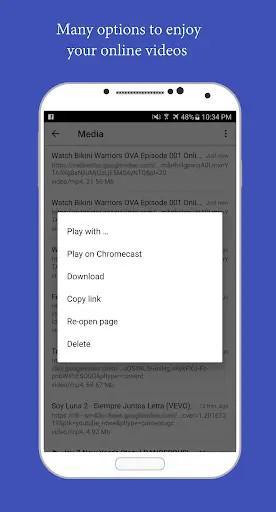
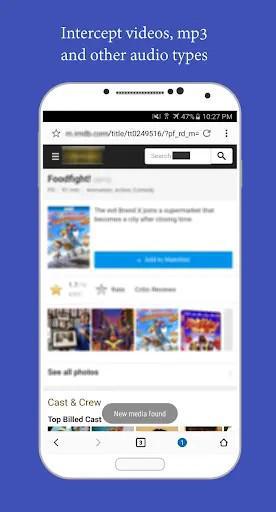
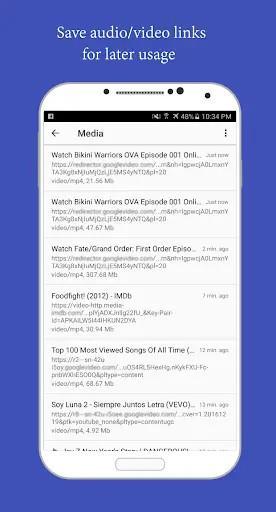
Applications Social Amaze Browser. Cast web videos  Amaze Browser. Cast web videos Amaze Browser Team Version 2.0.5 Install+500From 3 Rates 4.7 CategorySocialSize4 MBLast Update2020 July 24 Introduction More Info Amaze is the best browser for watching & downloading online videos. It's lightweight, has built-in ad-blocker, built-in download manager, Chromecast support, and a list of good features: - Capture videos, mp3 and other audio types as you browse the web with no time delays - Save video/audio links, so you can use them later without re-visiting the webpages - Fast download videos/mp3 by using multithreading (increase the download speed into several times), built-in download manager, allow pause, resume downloads. There's also an option to use system default or third party download managers on your device - Support Chromecast - allow you to cast videos to your TV through regular Chromecast, or listen to your favorite music with Chromecast Audio. Allow you to set the cast title and subtitle on the notification, which will give you a bit more privacy, as cast notification appears on all devices in the same WIFI network - Use the captured video/audio links with other apps - this great feature gives you more flexibility - to open them directly with the best video/audio players, in a floating window with a floating video player, or redirect them through other apps to Kodi, Raspberry Pi, Smart TV etc. - Built-in Ad-blocker - get rid of annoying ads on websites and let you focus on the main content, has adblock - whitelist to allow certain sites to show ads - Bubble/popup browser mode - When you click on a link from other apps, Amaze Bubble loads that webpage in the background, not interrupting your workflow with the current app. You can also search or enter address, access your bookmarks directly in bubble mode, switch between bubble mode and full browser mode without reloading a single webpage. - Surf the web in private using Incognito Mode - Amaze Browser will not keep track of your browsing activity, passwords, caches or browsing history in this mode - Easy to use, beautiful and optimized user interface Features: - Start page - Bookmarks - Private/Incognito - Multi-tabs - No-image mode - Search engine switch - Desktop mode - Rendering mode - Customization (theme/layout) - Bubble browser mode - Ad-block - Video/audio detection - Download manager - Chromecast support HOW TO CAST VIDEOS TO CHROMECATST: - Configure your Chromecast with Google Home, make sure it's in the same WIFI network with your device, or guest mode is enabled - Make sure you're in media detection mode - Open websites with videos/audio (flash video/audio is not supported) - Hit play button and wait for the app to detect video/audio links - Open the media list, click on a video link, and choose "play on chromecast" - Use the cast notification, or the cast-controller to control your playback HOW TO SETUP BUBBLE/POPUP MODE: - When you launch the app the first time, open menu, choose "Switch to bubble mode", you will be asked to grant "draw over apps" permission, accept it, then go back and try again. - Open menu, open settings, scroll down to bottom and click on "Add bubble shortcut to homescreen", now you can launch the app directly in bubble mode - To open links from other apps, choose "Amaze bubble" - For more convenience, you can set Amaze Bubble as your default browser, first clear your current default browser, then when open a link, choose Amaze Bubble, and choose "always" Important note: - This browser is built on top of system webview, if you're on Android 5+, update your system webview to the latest version for better compatibility. - Download videos from YouTube is not supported due to their term of services. User Reviews - 3 Rates 4.7 from 5 5 4 3 2 1  ایرانی 2022/08/18 من برای دانلود فیلم هایی که امکان دانلود ندارند یا سختن ازش استفاده میکنم.  reza soty 2023/03/01 عالی More Comments Related Applications  Privacy Messenger-SMS Call app Social   Ecosia - Safe Internet Browser Social   😂 WAStickerApps Funny Memes Stickers for WhatsApp Social   New WAStickerApps 🦄 Unicorn Stickers For WhatsApp Social   Dialer IOS12 style Social   Web Browser ( Fast & Secure We Social   Lightning Browser - Web Browser Social   Browser - Fast and Smart Explorer Social   Dolphin Zero Incognito Browser Social   CM Browser -Private, AdBlocker Social  Users Also Installed  Modern City Coach Bus Simulator: Bus Driving Games Travel & Local   Name Photo On Birthday Cake Photography   Droid Device Info Tools   Letterboxd Social   e& UAE Tools   Live Street View - Earth Map Satellite & GPS Map Travel & Local   Sticker maker - WASticker Personalization   Offline Language Translator Tools   DU Browser Tools   APUS Browser-Private & Fast Personalization  Similar Applications  All Video Downloader & Player Tools   VD Browser & Video Downloader Tools   Tube Video Downloader/ For All Photography   Dolphin Browser: Fast, Private Tools   HD Video Player Photography   Download Manager for Android Tools   TV-Browser Internet Tools   All video downloader&Play Tube Education   Video Downloader & Video Saver Photography   All Screen Cast to TV Roku Photography  Video Game App Install Bazaar Introduction Amaze is the best browser for watching & downloading online videos. It's lightweight, has built-in ad-blocker, built-in download manager, Chromecast support, and a list of good features: - Capture videos, mp3 and other audio types as you browse the web with no time delays - Save video/audio links, so you can use them later without re-visiting the webpages - Fast download videos/mp3 by using multithreading (increase the download speed into several times), built-in download manager, allow pause, resume downloads. There's also an option to use system default or third party download managers on your device - Support Chromecast - allow you to cast videos to your TV through regular Chromecast, or listen to your favorite music with Chromecast Audio. Allow you to set the cast title and subtitle on the notification, which will give you a bit more privacy, as cast notification appears on all devices in the same WIFI network - Use the captured video/audio links with other apps - this great feature gives you more flexibility - to open them directly with the best video/audio players, in a floating window with a floating video player, or redirect them through other apps to Kodi, Raspberry Pi, Smart TV etc. - Built-in Ad-blocker - get rid of annoying ads on websites and let you focus on the main content, has adblock - whitelist to allow certain sites to show ads - Bubble/popup browser mode - When you click on a link from other apps, Amaze Bubble loads that webpage in the background, not interrupting your workflow with the current app. You can also search or enter address, access your bookmarks directly in bubble mode, switch between bubble mode and full browser mode without reloading a single webpage. - Surf the web in private using Incognito Mode - Amaze Browser will not keep track of your browsing activity, passwords, caches or browsing history in this mode - Easy to use, beautiful and optimized user interface Features: - Start page - Bookmarks - Private/Incognito - Multi-tabs - No-image mode - Search engine switch - Desktop mode - Rendering mode - Customization (theme/layout) - Bubble browser mode - Ad-block - Video/audio detection - Download manager - Chromecast support HOW TO CAST VIDEOS TO CHROMECATST: - Configure your Chromecast with Google Home, make sure it's in the same WIFI network with your device, or guest mode is enabled - Make sure you're in media detection mode - Open websites with videos/audio (flash video/audio is not supported) - Hit play button and wait for the app to detect video/audio links - Open the media list, click on a video link, and choose "play on chromecast" - Use the cast notification, or the cast-controller to control your playback HOW TO SETUP BUBBLE/POPUP MODE: - When you launch the app the first time, open menu, choose "Switch to bubble mode", you will be asked to grant "draw over apps" permission, accept it, then go back and try again. - Open menu, open settings, scroll down to bottom and click on "Add bubble shortcut to homescreen", now you can launch the app directly in bubble mode - To open links from other apps, choose "Amaze bubble" - For more convenience, you can set Amaze Bubble as your default browser, first clear your current default browser, then when open a link, choose Amaze Bubble, and choose "always" Important note: - This browser is built on top of system webview, if you're on Android 5+, update your system webview to the latest version for better compatibility. - Download videos from YouTube is not supported due to their term of services.

You may also be interested

Dns Speed Test icon

  • 9 downloads
  • 7.8 MiB
Bet On Air icon
  • 17 downloads
  • 21.3 MiB
YouTube icon
  • 45 downloads
  • 11.1 MiB
NewPipe icon
  • 15 downloads
  • 11.1 MiB
Logic Circuit Simulator Pro icon
  • 10 downloads
  • 21.7 MiB
Fotor icon
  • 14 downloads
  • 247.7 MiB
Jigsawscapes icon
  • 10 downloads
  • 86.7 MiB
Tricky words icon
  • 11 downloads
  • 36.7 MiB
Pinget icon
  • 5 downloads
  • 36.5 MiB
Picsart icon
  • 9 downloads
  • 77.1 MiB
Food Diary icon
  • 3 downloads
  • 30.9 MiB
Grammatisch icon
  • 1 downloads
  • 37.7 MiB
JavaScript Editor icon
  • 4 downloads
  • 3.8 MiB
Hermit icon
  • 4 downloads
  • 7.0 MiB
Kids Place icon
  • 1 downloads
  • 19.3 MiB
DaRemote icon
  • 1 downloads
  • 28.3 MiB
Flud icon
  • 5 downloads
  • 19.6 MiB
ArduinoDroid icon
  • 1 downloads
  • 140.3 MiB
CalcNote icon
  • 2 downloads
  • 23.9 MiB
Aptitude Test icon
  • 4 downloads
  • 14.7 MiB
Review icon
  • 1 downloads
  • 17.1 MiB
Nebula icon
  • 0 downloads
  • 51.4 MiB
Mazii icon
  • 1 downloads
  • 99.0 MiB
nzb360 icon
  • 4 downloads
  • 18.4 MiB
Structured icon
  • 4 downloads
  • 21.8 MiB
Word Counter icon
  • 1 downloads
  • 28.6 MiB
Avia Weather icon
  • 3 downloads
  • 15.0 MiB
Battery Sound Alert icon
  • 8 downloads
  • 3.4 MiB
Nagram X icon
  • 27 downloads
  • 47.9 MiB
Stryker icon
  • 71 downloads
  • 8.9 MiB
Spotishka Mystery icon
  • 87 downloads
  • 96.2 MiB
NewPipe icon
  • 103 downloads
  • 11.9 MiB
Perplexity icon
  • 161 downloads
  • 86.0 MiB
Melolo icon
  • 30 downloads
  • 131.7 MiB
YouTube Morphe icon
  • 129 downloads
  • 88.5 MiB
Geto icon
  • 45 downloads
  • 2.1 MiB
Game Hub icon
  • 48 downloads
  • 16.5 MiB
O Launcher icon
  • 41 downloads
  • 33.8 MiB
Pie Launcher icon
  • 24 downloads
  • 35.0 MiB
Story Maker icon
  • 18 downloads
  • 108.3 MiB
The Day Before icon
  • 6 downloads
  • 104.0 MiB
YourHour icon
  • 1 downloads
  • 33.2 MiB
Truecaller icon
  • 33 downloads
  • 109.4 MiB
Quick Cursor icon
  • 16 downloads
  • 5.0 MiB
LED Flow icon
  • 58 downloads
  • 7.1 MiB
AOD Flow icon
  • 42 downloads
  • 10.9 MiB
PlayBack icon
  • 33 downloads
  • 8.5 MiB
Music player icon
  • 33 downloads
  • 24.5 MiB
Folder Player Pro icon
  • 23 downloads
  • 4.6 MiB
Utool icon
  • 83 downloads
  • 42.7 MiB
Justice Rivals 3 icon
  • 11 downloads
  • 126.9 MiB
Novel Scraper icon
  • 52 downloads
  • 15.2 MiB
Fulguris icon
  • 52 downloads
  • 9.9 MiB
GROK icon
  • 606 downloads
  • 96.1 MiB
MuscleMonster icon
  • 33 downloads
  • 82.7 MiB
Ampere icon
  • 52 downloads
  • 21.1 MiB
SpeedTop icon
  • 169 downloads
  • 40.6 MiB
WebShuttle icon
  • 149 downloads
  • 5.1 MiB
Win 11 Launcher icon
  • 21 downloads
  • 13.7 MiB
Screen Mirroring icon
  • 53 downloads
  • 24.6 MiB
Fun Habit icon
  • 4 downloads
  • 6.4 MiB
Appteka icon
  • 4640 downloads
  • 4.4 MiB
Gboard Material Expressive Black icon
  • 86 downloads
  • 26.7 KiB
ReVanced Xposed icon
  • 148 downloads
  • 6.0 MiB
34Bets icon
  • 84 downloads
  • 23.4 MiB
Send Files To TV icon
  • 87 downloads
  • 9.8 MiB
Appwatch icon
  • 100 downloads
  • 3.9 MiB
ThemePik: Icon Changer icon
  • 65 downloads
  • 31.0 MiB
Big Font - Change font size icon
  • 53 downloads
  • 11.6 MiB
WiFi Master icon
  • 225 downloads
  • 17.0 MiB
WebShuttle icon
  • 129 downloads
  • 5.7 MiB
PinLockView icon
  • 49 downloads
  • 42.0 MiB
SimpleCalc+ icon
  • 27 downloads
  • 1.8 MiB
Game Mode icon
  • 86 downloads
  • 13.2 MiB
HDx Player icon
  • 53 downloads
  • 35.9 MiB
Meduza icon
  • 16 downloads
  • 112.1 MiB
Torrents Digger icon
  • 95 downloads
  • 23.2 MiB
Jami icon
  • 125 downloads
  • 92.1 MiB
WebLibre icon
  • 51 downloads
  • 118.7 MiB
Wafrn icon
  • 17 downloads
  • 32.1 MiB
Running Services Monitor icon
  • 77 downloads
  • 8.7 MiB
Mages icon
  • 8 downloads
  • 86.7 MiB
SpotiFLAC icon
  • 136 downloads
  • 43.6 MiB
Morphe icon
  • 169 downloads
  • 23.1 MiB
AAAD icon
  • 45 downloads
  • 32.3 MiB
Parrot Downloader icon
  • 34 downloads
  • 113.4 MiB
Snaptube icon
  • 196 downloads
  • 24.9 MiB
InxLocker icon
  • 30 downloads
  • 4.1 MiB
SpeedTop icon
  • 155 downloads
  • 40.7 MiB
Muviz Edge icon
  • 55 downloads
  • 21.3 MiB
Windy icon
  • 66 downloads
  • 70.5 MiB
PhotoDirector icon
  • 121 downloads
  • 170.0 MiB
Snaptube icon
  • 237 downloads
  • 50.2 MiB
Groove Launcher icon
  • 12 downloads
  • 14.2 MiB
SVPlayer icon
  • 140 downloads
  • 58.2 MiB
Lane icon
  • 35 downloads
  • 45.4 MiB