Download Appteka (works without ads)

Appteka is a community-driven, free Android apps market

Moises Premium

Moises Premium icon

Moises Premium

78 downloads

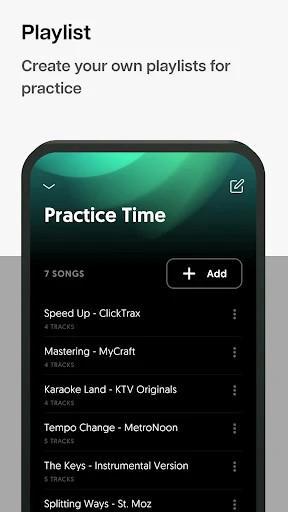
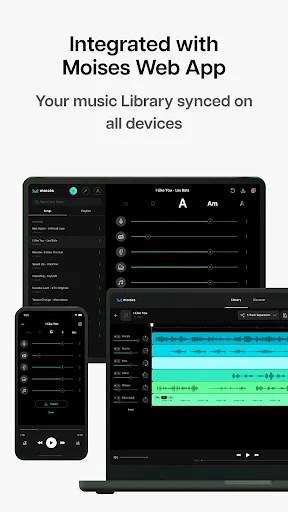
Screenshot Screenshot Screenshot Screenshot Screenshot Screenshot Screenshot Screenshot
Uploaded by
CODEMASTER 👻
Version
2.65.0 (build 905) 
Size
86.0 MiB
Publish Date
2025-06-07
Category
Music & Audio
Package
ai.moises
Minimum OS
Android 9.0
SHA1
3013b92ff3e7fb1f765bcfe525784dd17f62293c
Description
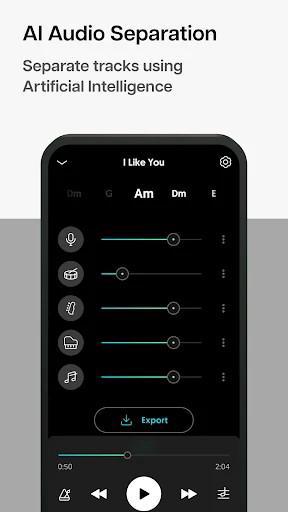
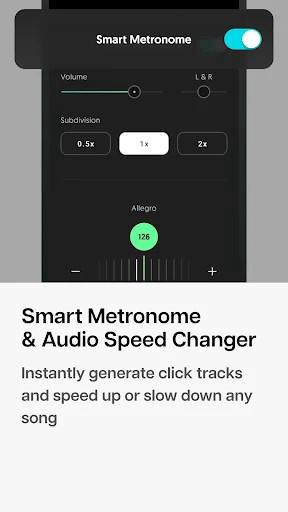
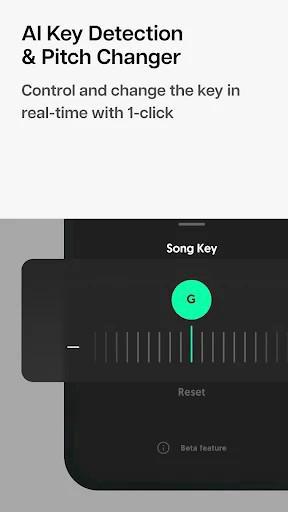
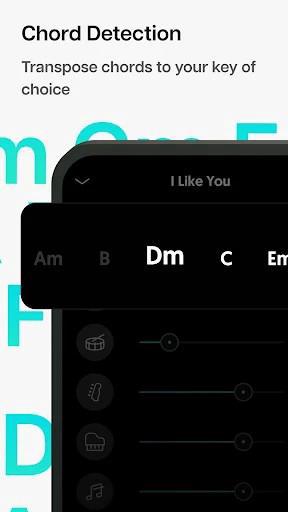
Moises v2.89.0 [MOD PREMIUM] Splitting music, singing along and playing music in Moises will help you unleash your favorite songs and create a variety of interesting tunes at your disposal. With Moises, a musical sky opens with new things from the most ordinary. Introduce about Moises Dedicated audio separation and music creation application on mobile! Which way of creating music is right for you? There are many ways for you to improve your music composition and creativity. There are big players tinkering with each sound quality one by one and then trimming, mixing, remixing, adding effects together to create a complete piece of music. This method is time consuming and probably requires a good rig. Others choose the shorter, simpler but equally effective route: extracting layers of favorite tones from an existing piece of music, then adding other sounds, melodies and mixing them in their own way. If you are creating music based on this approach, can find a useful companion called Moises. What is Moises? This is the application that helps you unleash your music creation flexibly, interestingly and save the most time and effort. In Moises, you can optionally separate, remove, and reduce one or more of the existing sound qualities in a piece of music. Then, combine with other melodies and sound quality such as bass, drums, guitar, piano, trumpet, flute… to create a piece of music as you like. Having such profound audio processing power, Moises is an application with powerful AI separation technology that can handle almost any sound requirement in all different types of music files. of the sound. With this feature you can slow down or speed up the sound with just a few simple steps. Moises does this well and maintains a rare synchronicity thanks to its useful BPM detection and visualization capabilities. Wanting to adjust the pitch to match your vocal range is also possible in Moises thanks to the Pitch Changer feature. You can customize any background music to change to your own voice or anyone else’s. Moises also has an AI Key Detection feature that helps users detect and change all the keys of a song into a chord form from simple to complex, up to 12 keys at the same time. What is audio separation and remix used for? Thanks to this powerful sound separation feature, Moises can help you create cuts and repeats of all your favorite pieces of music that contain the desired sound quality. Another useful one is for creating background music mixes. From the separated audio files, adding the remix to your own liking, you can have a background music that greatly enhances your voice or completely transitions to a new music style. Acapella accompaniment, drum accompaniment, guitar accompaniment, bass accompaniment and even pi accompaniment are possible based on the sound separation in Moises. Moises can provide unlimited support for any style of composition as well as the genre of music you are looking to pursue. As long as you have an idea and want to renew yourself with a new method of composition, Moises will support it to the end. Audio Separation, Moises’ famously powerful feature First let’s talk about sound isolation in Moises. Thanks to the integrated AI Audio Separation, users can with just a few simple steps separate different types of sounds in the same piece/song of music. Whether it’s vocals, piano, strings, or guitar, trumpet, or flute players, whether the song is a grand ensemble, Moises still does a good job of separating sounds. After separating the audio, the application can immediately output audio files in a pre-selected format from the user. Moises flexibly outputs files as individual sound types or custom audio mixes with the same quality as the original. Files can be stored locally, in the cloud, or in the form of an unfinished project that needs to be further manipulated within the application. Customize every sound file and chord To create a complete song, you will need some professional audio editing and processing features. Moises offers this range of features and gets you done with a simple touch of the screen. Specifically, when you need to create songs that require high synchronization with your favorite songs, you will use the Smart Metronome feature. When you need to create an audio mix with previously synchronized chords, you have Chord Detection available to you. In the process of customizing single or mixed audio types, the user is free to change the speed of the sound. With this feature you can slow down or speed up the sound with just a few simple steps. Moises does this well and maintains a rare synchronicity thanks to its useful BPM detection and visualization capabilities

You may also be interested

ReVanced Xposed icon
  • 31 downloads
  • 6.0 MiB
34Bets icon
  • 18 downloads
  • 23.4 MiB
Appwatch icon
  • 36 downloads
  • 3.9 MiB
ThemePik: Icon Changer icon
  • 20 downloads
  • 31.0 MiB
Big Font - Change font size icon
  • 19 downloads
  • 11.6 MiB
WiFi Master icon
  • 72 downloads
  • 17.0 MiB
WebShuttle icon
  • 47 downloads
  • 5.7 MiB
PinLockView icon
  • 13 downloads
  • 42.0 MiB
SimpleCalc+ icon
  • 10 downloads
  • 1.8 MiB
Game Mode icon
  • 23 downloads
  • 13.2 MiB
HDx Player icon
  • 15 downloads
  • 35.9 MiB
Torrents Digger icon
  • 17 downloads
  • 23.2 MiB
Jami icon
  • 18 downloads
  • 92.1 MiB
WebLibre icon
  • 24 downloads
  • 118.7 MiB
Wafrn icon
  • 6 downloads
  • 32.1 MiB
Running Services Monitor icon
  • 16 downloads
  • 8.7 MiB
Mages icon
  • 5 downloads
  • 86.7 MiB
SpotiFLAC icon
  • 40 downloads
  • 43.6 MiB
Morphe icon
  • 64 downloads
  • 23.1 MiB
AAAD icon
  • 11 downloads
  • 32.3 MiB
Snaptube icon
  • 87 downloads
  • 24.9 MiB
InxLocker icon
  • 17 downloads
  • 4.1 MiB
SpeedTop icon
  • 111 downloads
  • 40.7 MiB
Muviz Edge icon
  • 32 downloads
  • 21.3 MiB
Windy icon
  • 34 downloads
  • 70.5 MiB
PhotoDirector icon
  • 100 downloads
  • 170.0 MiB
Snaptube icon
  • 140 downloads
  • 50.2 MiB
SVPlayer icon
  • 105 downloads
  • 58.2 MiB
OpenTracks icon
  • 23 downloads
  • 8.5 MiB
VPN Proxy Master icon
  • 90 downloads
  • 41.3 MiB
3C Explorer icon
  • 44 downloads
  • 11.8 MiB
3C Explorer icon
  • 13 downloads
  • 11.6 MiB
Phases of the Moon Pro icon
  • 77 downloads
  • 51.7 MiB
Arc Player icon
  • 85 downloads
  • 14.5 MiB
Arc Player icon
  • 31 downloads
  • 14.1 MiB
nzb360 icon
  • 22 downloads
  • 16.5 MiB
Castify icon
  • 73 downloads
  • 13.0 MiB
iCallDialer icon
  • 63 downloads
  • 16.4 MiB
YouCam Makeup icon
  • 41 downloads
  • 166.8 MiB
mAst icon
  • 19 downloads
  • 93.5 MiB
Weather Network icon
  • 45 downloads
  • 36.7 MiB
MATE VPN icon
  • 138 downloads
  • 29.9 MiB
Choices icon
  • 88 downloads
  • 118.8 MiB
Romance Club icon
  • 35 downloads
  • 84.2 MiB
AyuGram icon
  • 73 downloads
  • 75.4 MiB
venera icon
  • 50 downloads
  • 16.7 MiB
YouTools icon
  • 53 downloads
  • 6.6 MiB
Logcat Extreme Pro icon
  • 30 downloads
  • 3.6 MiB
Morphe icon
  • 204 downloads
  • 23.1 MiB
Ventoy icon
  • 51 downloads
  • 75.4 MiB
USB TOOLS icon
  • 65 downloads
  • 59.5 MiB
USB File Manager icon
  • 35 downloads
  • 55.9 MiB
Ultimate USB icon
  • 67 downloads
  • 77.6 MiB
Hot Movies icon
  • 611 downloads
  • 9.1 MiB
MultiOS USB icon
  • 23 downloads
  • 64.4 MiB
ISO2USB icon
  • 23 downloads
  • 61.2 MiB
Telegram+ icon
  • 208 downloads
  • 121.5 MiB
DROFUS icon
  • 25 downloads
  • 61.2 MiB
PFEI icon
  • 22 downloads
  • 20.4 MiB
Morphe icon
  • 119 downloads
  • 23.1 MiB
ZERO Cleaner icon
  • 250 downloads
  • 4.7 MiB
GO Translate icon
  • 140 downloads
  • 61.0 MiB
AI Cleaner icon
  • 211 downloads
  • 18.0 MiB
Phone Cleaner icon
  • 81 downloads
  • 20.0 MiB
ZX File Manager icon
  • 108 downloads
  • 26.8 MiB
FTP File Manager icon
  • 58 downloads
  • 7.6 MiB
Smart Alarm icon
  • 24 downloads
  • 9.3 MiB
POCO Launcher icon
  • 82 downloads
  • 22.4 MiB
Battery One icon
  • 72 downloads
  • 20.0 MiB
Quick apps Service Framework icon
  • 49 downloads
  • 314.0 MiB
Буковки+ icon
  • 74 downloads
  • 186.2 MiB
Win 11 Launcher icon
  • 86 downloads
  • 13.7 MiB
VK X icon
  • 100 downloads
  • 38.2 MiB
Super Planner icon
  • 31 downloads
  • 21.2 MiB
Serene icon
  • 12 downloads
  • 17.0 MiB
GymStreak icon
  • 26 downloads
  • 37.8 MiB
YarnPal icon
  • 19 downloads
  • 39.5 MiB
Money Manager icon
  • 19 downloads
  • 24.3 MiB
ManaBox icon
  • 55 downloads
  • 109.4 MiB
Wallet icon
  • 16 downloads
  • 19.3 MiB
Fitbod icon
  • 17 downloads
  • 62.9 MiB
quinn icon
  • 36 downloads
  • 18.6 MiB
Stoxy Pro icon
  • 64 downloads
  • 16.8 MiB
USB Dual Camera Pro icon
  • 32 downloads
  • 78.1 MiB
USB Camera Pro icon
  • 42 downloads
  • 80.2 MiB
IP Camera Pro icon
  • 65 downloads
  • 47.6 MiB
Learna AI icon
  • 45 downloads
  • 69.5 MiB
the Weather icon
  • 51 downloads
  • 74.6 MiB
the Weather icon
  • 12 downloads
  • 75.3 MiB
Netflix icon
  • 631 downloads
  • 37.6 MiB
Castify icon
  • 53 downloads
  • 26.9 MiB
Samsung Smart View - Cast To icon
  • 58 downloads
  • 27.4 MiB
Monfluo icon
  • 11 downloads
  • 28.5 MiB
AudioLab icon
  • 51 downloads
  • 33.2 MiB
DeepSeek icon
  • 212 downloads
  • 12.6 MiB
MX Player icon
  • 223 downloads
  • 80.9 MiB