Download Appteka (works without ads)

Appteka is a community-driven, free Android apps market

SmartTube

SmartTube icon

SmartTube

96 downloads

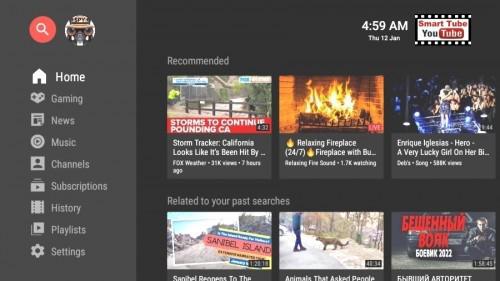
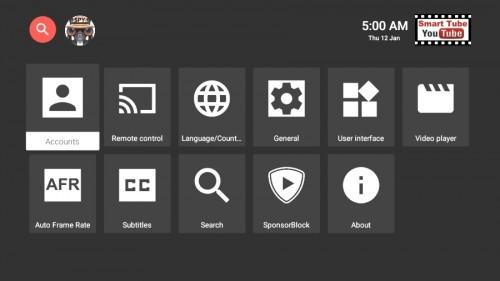
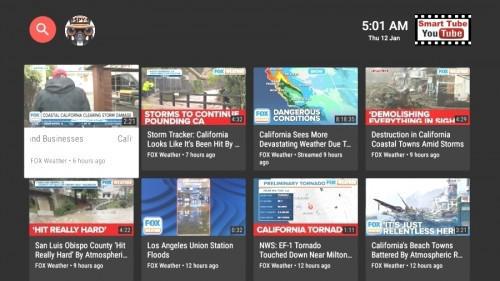
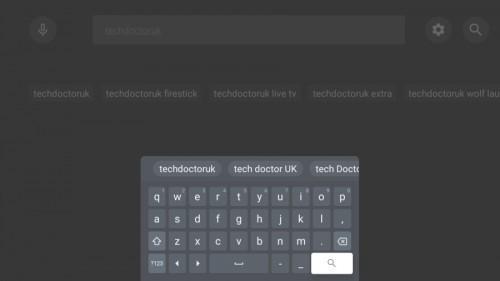
Screenshot Screenshot Screenshot Screenshot Screenshot
Uploaded by
CODEMASTER 👻
Version
25.08 (build 1698) 
Size
18.3 MiB
Publish Date
2024-12-10
Category
TV
Package
com.teamsmart.videomanager.tv
Minimum OS
Android 4.2
SHA1
b793696901007316f72ef61575e31494982f7b41
Description
SmartTube AKA SmartTubeNext v25.08 [Landscape Custom Mod] [arm64-v8a] [Phones Only] [Login/Search Fixed] Ad-Free App For Watching YouTube Videos On Multiple TV Devices SmartTubeNext is an advanced YouTube app for Android TVs and TV boxes, free & open source. It is not a live TV client and does not support "YouTube TV". Disadvantages: no comments stability, voice search and casting support might be worse than in the official YouTube, depending on your device; give it a try! Compatibility SmartTubeNext requires Android 4.3 or above. It does not work on non-Android devices (incl. LG or Samsung TVs). On unsupported TVs, you can use a TV stick or TV box. Though this app technically runs on smartphones and tablets, it is not optimized for such and offers no official support! It has been successfully tested on TVs, TV boxes and TV sticks that are based on Android, including: Android TVs & Google TVs (e.g. Philips, Sony) Chromecast with Google TV & TVs with Chromecast built-in Amazon FireTV stick (all generations) NVIDIA Shield TV boxes running Android (many cheap chinese no-name boxes) Xiaomi Mi Box Features Include: Adblocking SmartTubeNext does not show any ad banners, preroll ads or ad intermissions. It not just tries to prevent them, it is literally programmed to be completely unable to display any ads, so YouTube cannot slip anything in. This also means you cannot allow ads or whitelist channels. Some YouTube channels include sponsored messages in their videos, these can also be skipped, see SponsorBlock below. SponsorBlock SmartTubeNext includes a SponsorBlock integration. From the SponsorBlock website: SponsorBlock is an open-source crowdsourced browser extension and open API for skipping sponsor segments in YouTube videos. [...] the extension automatically skips sponsors it knows about using a privacy preserving query system. It also supports skipping other categories, such as intros, outros and reminders to subscribe [and non-music parts in music videos]. You can select which categories you want to skip in the settings. Unlike the browser addon, in SmartTubeNext you cannot submit new segments (TVs and TV remotes aren't great devices for such precise operations). Note that SponsorBlock is a free and voluntary project based on user submissions, so don't expect it to 100% work every time. Sometimes, sponsor segments are not yet submitted to the database, sometimes the SponsorBlock servers are offline/overloaded. Casting To cast videos from your phone (or other devices), you must link that device to your TV. Unlike the original YouTube app, SmartTubeNext does not automatically show up when you are in the same wifi network. How to link your smartphone and TV: 1)open SmartTubeNext and go to settings 2)go to "Remote control" (2nd option) 3)open your YouTube app on your phone, go to settings > General > watch on TV 4)click on connect using TV-code and enter the code from your TV Due to technical limitations, you need to open the app on the TV before casting; SmartTubeNext cannot automatically wake up the TV. Picture-in-Picture (PiP) SmartTubeNext supports playing videos in PiP mode. This needs to be enabled under Settings > General > Background playback > Picture in picture. The video will go into PiP mode when you press home while playing a video, and also when you press back if enabled in Settings > General > Background playback (activation). Adjust Speed You can adjust the playback speed pressing the speed-indicator icon (gauge) in the top row of the player. This is remembered across videos. Some speeds may case frame drops, this is a known issue. Voice Search To enable global voice search, an additional app must be installed alongside SmartTubeNext. This bridge app can intercept the System's attempts to open the original YouTube app and open SmartTubeNext instead. For this to work, you must uninstall the original YouTube app. We know this sucks, but you can always reinstall it if you change your mind. The bridge app will not show up in your launcher and you do cannot to launch it directly; it is only used internally by the system's voice search. On some devices, you need to explicitly say "Youtube" when searching (e.g. say "youtube cute cats" instead of just "cute cats"). On Amazon Fire TV: 1)Uninstall the original YouTube app (no root required) 2)Download and install the Amazon Bridge SmartTubeNext app: https://kutt.it/stn_bridge_amazon (e.g. via Downloader by AFTVnews) On Google Chromecast with Google TV: 1)Uninstall the original YouTube app (no root required) 2)Download and install the ATV Bridge SmartTubeNext app: https://kutt.it/stn_bridge_atv (e.g. via Downloader by AFTVnews) On all other Android devices, sadly root is required to enable this: 1)Root your device (search for a guide for your specific device) 2)Uninstall the official YouTube app using root (adb shell pm uninstall com.google.android.youtube.tv) 3)Download and install the ATV Bridge SmartTubeNext app: https://kutt.it/stn_bridge_atv (e.g. via Downloader by AFTVnews) What's New: VERSION 25.08 Dec 9, 2024 Proper changelog for Stable Previous release fixes: -App functions restored -Video buffering fixes -Hide shorts from search (Settings/General/Hide unwanted content) -Empty Home fix (anonymous user) [still empty] -Improved recommendations

You may also be interested

PDFelement icon
  • 6 downloads
  • 100.4 MiB
Nagram X icon
  • 19 downloads
  • 47.4 MiB
Philosophy Quotes icon
  • 6 downloads
  • 31.1 MiB
Philosophy icon
  • 2 downloads
  • 24.7 MiB
Letterboxd icon
  • 2 downloads
  • 71.6 MiB
JavaScript Editor icon
  • 5 downloads
  • 3.8 MiB
Flexcil icon
  • 1 downloads
  • 73.6 MiB
Dr. Kegel icon
  • 2 downloads
  • 67.4 MiB
Eyecon icon
  • 2 downloads
  • 46.6 MiB
Day One icon
  • 0 downloads
  • 34.2 MiB
BlackOut icon
  • 2 downloads
  • 13.8 MiB
9GAG icon
  • 1 downloads
  • 26.7 MiB
AI Excel Formula Generator icon
  • 7 downloads
  • 8.7 MiB
Avia Maps icon
  • 3 downloads
  • 43.0 MiB
ScorePDF icon
  • 0 downloads
  • 19.8 MiB
eXpend icon
  • 2 downloads
  • 37.3 MiB
Room Screen icon
  • 1 downloads
  • 16.1 MiB
KMPlayer Plus (Divx) icon
  • 9 downloads
  • 194.6 MiB
Snaptube icon
  • 19 downloads
  • 49.9 MiB
Today Weather icon
  • 7 downloads
  • 24.8 MiB
Knowunity icon
  • 3 downloads
  • 121.7 MiB
YouCine icon
  • 22 downloads
  • 30.9 MiB
Player Pro icon
  • 57 downloads
  • 26.1 MiB
VivaTV icon
  • 57 downloads
  • 13.6 MiB
Rapid Streamz icon
  • 58 downloads
  • 12.6 MiB
PLAYFy TV icon
  • 49 downloads
  • 12.1 MiB
Ventusky icon
  • 52 downloads
  • 31.2 MiB
Ventusky icon
  • 4 downloads
  • 30.8 MiB
Mycima icon
  • 94 downloads
  • 47.4 MiB
MOVIES HUB icon
  • 49 downloads
  • 48.2 MiB
GStream icon
  • 44 downloads
  • 10.7 MiB
FLIX VISION icon
  • 33 downloads
  • 48.1 MiB
Акции всех магазинов icon
  • 10 downloads
  • 27.7 MiB
Calisteniapp icon
  • 7 downloads
  • 34.1 MiB
Google Play Store icon
  • 111 downloads
  • 91.1 MiB
Google Play Store icon
  • 8 downloads
  • 91.6 MiB
Google Play Store icon
  • 10 downloads
  • 92.4 MiB
Equalizer icon
  • 17 downloads
  • 10.3 MiB
Reminder Pro icon
  • 2 downloads
  • 3.7 MiB
DAVx⁵ icon
  • 5 downloads
  • 11.9 MiB
Comfer icon
  • 7 downloads
  • 3.5 MiB
SpotiQ Ten icon
  • 14 downloads
  • 6.1 MiB
Magic Eraser icon
  • 29 downloads
  • 10.4 MiB
Solid Explorer icon
  • 30 downloads
  • 23.5 MiB
Solid Explorer icon
  • 4 downloads
  • 22.4 MiB
Sonolus icon
  • 15 downloads
  • 108.2 MiB
HappyTaxes icon
  • 3 downloads
  • 26.8 MiB
Running Services Monitor icon
  • 28 downloads
  • 10.4 MiB
IP Wizard icon
  • 17 downloads
  • 4.2 MiB
Schmackofatz icon
  • 2 downloads
  • 15.6 MiB
قرآني icon
  • 14 downloads
  • 17.4 MiB
Vpnify icon
  • 88 downloads
  • 37.7 MiB
PassVault icon
  • 5 downloads
  • 3.4 MiB
Calisthenics Memory icon
  • 5 downloads
  • 8.6 MiB
Medical Calendarlog icon
  • 6 downloads
  • 2.9 MiB
Anthology icon
  • 5 downloads
  • 4.0 MiB
Tyr icon
  • 5 downloads
  • 12.0 MiB
Qm Authenticator icon
  • 2 downloads
  • 9.4 MiB
Operator icon
  • 45 downloads
  • 10.8 MiB
v2rayNG icon
  • 71 downloads
  • 88.4 MiB
Privacium icon
  • 6 downloads
  • 4.5 MiB
DeJPEG icon
  • 18 downloads
  • 26.9 MiB
Linphone icon
  • 5 downloads
  • 56.3 MiB
Torrents Digger icon
  • 16 downloads
  • 22.2 MiB
nthLink icon
  • 57 downloads
  • 100.0 MiB
Thunderbird icon
  • 3 downloads
  • 12.3 MiB
Linux Command Library icon
  • 28 downloads
  • 15.1 MiB
Converter NOW icon
  • 3 downloads
  • 54.4 MiB
OONI Probe icon
  • 6 downloads
  • 71.9 MiB
Phocid icon
  • 5 downloads
  • 21.0 MiB
FlorisBoard icon
  • 15 downloads
  • 14.1 MiB
Meshtastic icon
  • 1 downloads
  • 15.0 MiB
ZipXtract icon
  • 11 downloads
  • 11.8 MiB
Clash Meta for Android icon
  • 25 downloads
  • 70.9 MiB
Talk icon
  • 3 downloads
  • 106.5 MiB
Amarok icon
  • 7 downloads
  • 7.0 MiB
Fonts icon
  • 13 downloads
  • 2.5 MiB
Wire icon
  • 4 downloads
  • 114.4 MiB
Jami icon
  • 3 downloads
  • 91.6 MiB
Gopeed icon
  • 9 downloads
  • 21.5 MiB
Kai icon
  • 22 downloads
  • 4.9 MiB
Cromite icon
  • 13 downloads
  • 158.5 MiB
XiVPN icon
  • 24 downloads
  • 25.5 MiB
Sideband icon
  • 2 downloads
  • 111.5 MiB
AnkiDroid icon
  • 5 downloads
  • 36.8 MiB
WebLibre icon
  • 12 downloads
  • 125.9 MiB
De1984 icon
  • 18 downloads
  • 6.0 MiB
Exclave icon
  • 2 downloads
  • 22.1 MiB
Infomaniak Mail icon
  • 2 downloads
  • 70.8 MiB
Flare icon
  • 5 downloads
  • 20.2 MiB
kDrive icon
  • 4 downloads
  • 99.0 MiB
Molly icon
  • 3 downloads
  • 85.7 MiB
Privacy Flip icon
  • 11 downloads
  • 2.0 MiB
ServerBox icon
  • 5 downloads
  • 39.5 MiB
Session icon
  • 4 downloads
  • 74.5 MiB
Torrent Search icon
  • 24 downloads
  • 2.8 MiB