Download Appteka (works without ads)

Appteka is a community-driven, free Android apps market

SmartTube

SmartTube icon

SmartTube

127 downloads

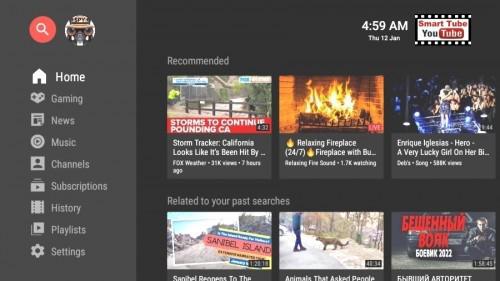
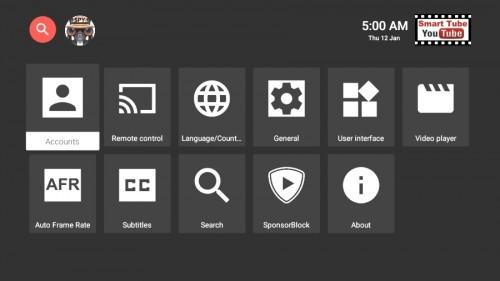
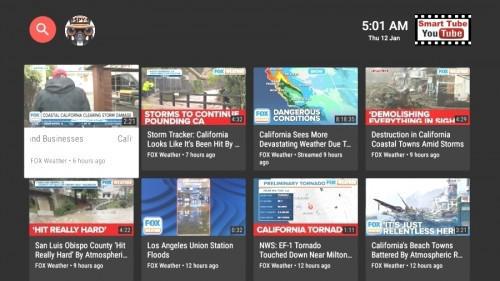
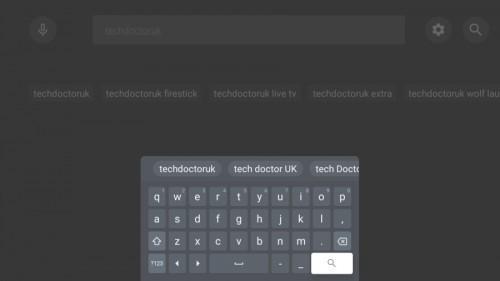
Screenshot Screenshot Screenshot Screenshot Screenshot
Uploaded by
CODEMASTER 👻
Version
24.71 (build 1661) 
Size
18.9 MiB
Publish Date
2024-11-17
Category
TV
Package
com.teamsmart.videomanager.tv
Minimum OS
Android 4.2
SHA1
ca4f9df9d12ca431e094ae5775ab8b12910a9fed
Description
Ad-Free App For Watching YouTube Videos On Multiple TV Devices SmartTubeNext is an advanced YouTube app for Android TVs and TV boxes, free & open source. It is not a live TV client and does not support "YouTube TV". Disadvantages: no comments stability, voice search and casting support might be worse than in the official YouTube, depending on your device; give it a try! Compatibility SmartTubeNext requires Android 4.3 or above. It does not work on non-Android devices (incl. LG or Samsung TVs). On unsupported TVs, you can use a TV stick or TV box. Though this app technically runs on smartphones and tablets, it is not optimized for such and offers no official support! It has been successfully tested on TVs, TV boxes and TV sticks that are based on Android, including: Android TVs & Google TVs (e.g. Philips, Sony) Chromecast with Google TV & TVs with Chromecast built-in Amazon FireTV stick (all generations) NVIDIA Shield TV boxes running Android (many cheap chinese no-name boxes) Xiaomi Mi Box Features Include: Adblocking SmartTubeNext does not show any ad banners, preroll ads or ad intermissions. It not just tries to prevent them, it is literally programmed to be completely unable to display any ads, so YouTube cannot slip anything in. This also means you cannot allow ads or whitelist channels. Some YouTube channels include sponsored messages in their videos, these can also be skipped, see SponsorBlock below. SponsorBlock SmartTubeNext includes a SponsorBlock integration. From the SponsorBlock website: SponsorBlock is an open-source crowdsourced browser extension and open API for skipping sponsor segments in YouTube videos. [...] the extension automatically skips sponsors it knows about using a privacy preserving query system. It also supports skipping other categories, such as intros, outros and reminders to subscribe [and non-music parts in music videos]. You can select which categories you want to skip in the settings. Unlike the browser addon, in SmartTubeNext you cannot submit new segments (TVs and TV remotes aren't great devices for such precise operations). Note that SponsorBlock is a free and voluntary project based on user submissions, so don't expect it to 100% work every time. Sometimes, sponsor segments are not yet submitted to the database, sometimes the SponsorBlock servers are offline/overloaded. Casting To cast videos from your phone (or other devices), you must link that device to your TV. Unlike the original YouTube app, SmartTubeNext does not automatically show up when you are in the same wifi network. How to link your smartphone and TV: 1)open SmartTubeNext and go to settings 2)go to "Remote control" (2nd option) 3)open your YouTube app on your phone, go to settings > General > watch on TV 4)click on connect using TV-code and enter the code from your TV Due to technical limitations, you need to open the app on the TV before casting; SmartTubeNext cannot automatically wake up the TV. Picture-in-Picture (PiP) SmartTubeNext supports playing videos in PiP mode. This needs to be enabled under Settings > General > Background playback > Picture in picture. The video will go into PiP mode when you press home while playing a video, and also when you press back if enabled in Settings > General > Background playback (activation). Adjust Speed You can adjust the playback speed pressing the speed-indicator icon (gauge) in the top row of the player. This is remembered across videos. Some speeds may case frame drops, this is a known issue. Voice Search To enable global voice search, an additional app must be installed alongside SmartTubeNext. This bridge app can intercept the System's attempts to open the original YouTube app and open SmartTubeNext instead. For this to work, you must uninstall the original YouTube app. We know this sucks, but you can always reinstall it if you change your mind. The bridge app will not show up in your launcher and you do cannot to launch it directly; it is only used internally by the system's voice search. On some devices, you need to explicitly say "Youtube" when searching (e.g. say "youtube cute cats" instead of just "cute cats"). On Amazon Fire TV: 1)Uninstall the original YouTube app (no root required) 2)Download and install the Amazon Bridge SmartTubeNext app: https://kutt.it/stn_bridge_amazon (e.g. via Downloader by AFTVnews) On Google Chromecast with Google TV: 1)Uninstall the original YouTube app (no root required) 2)Download and install the ATV Bridge SmartTubeNext app: https://kutt.it/stn_bridge_atv (e.g. via Downloader by AFTVnews) On all other Android devices, sadly root is required to enable this: 1)Root your device (search for a guide for your specific device) 2)Uninstall the official YouTube app using root (adb shell pm uninstall com.google.android.youtube.tv) 3)Download and install the ATV Bridge SmartTubeNext app: https://kutt.it/stn_bridge_atv (e.g. via Downloader by AFTVnews)

You may also be interested

Truecaller icon
  • 108 downloads
  • 94.6 MiB
Deep OS Launcher icon
  • 50 downloads
  • 45.8 MiB
Fulguris icon
  • 21 downloads
  • 7.5 MiB
XTREAM IPTV icon
  • 39 downloads
  • 53.8 MiB
XTREAM IPTV icon
  • 24 downloads
  • 53.2 MiB
BuzzKill icon
  • 12 downloads
  • 22.9 MiB
BuzzKill icon
  • 1 downloads
  • 17.6 MiB
BROWSER icon
  • 70 downloads
  • 20.7 MiB
Win 11 Launcher icon
  • 10 downloads
  • 11.4 MiB
YouTube icon
  • 82 downloads
  • 17.3 MiB
YT Music ReVanced icon
  • 40 downloads
  • 66.7 MiB
AAAD icon
  • 36 downloads
  • 31.6 MiB
Pencil Photo Sketch icon
  • 18 downloads
  • 120.3 MiB
µTorrent icon
  • 21 downloads
  • 45.7 MiB
Floating Notes icon
  • 17 downloads
  • 17.6 MiB
Facemoji Keyboard icon
  • 12 downloads
  • 36.9 MiB
FixPlus icon
  • 43 downloads
  • 48.2 MiB
YouTube Premium icon
  • 123 downloads
  • 108.2 MiB
SD Maid SE icon
  • 100 downloads
  • 10.6 MiB
SD Maid SE icon
  • 20 downloads
  • 10.0 MiB
AdGuard VPN icon
  • 97 downloads
  • 47.5 MiB
PDF Viewer icon
  • 55 downloads
  • 14.6 MiB
VRadio icon
  • 41 downloads
  • 20.8 MiB
AAAD icon
  • 25 downloads
  • 32.1 MiB
Ventoy icon
  • 39 downloads
  • 105.9 MiB
USB TOOLS icon
  • 40 downloads
  • 90.0 MiB
МТС Музыка icon
  • 30 downloads
  • 38.6 MiB
USB File Manager icon
  • 30 downloads
  • 86.4 MiB
Yandex Music icon
  • 53 downloads
  • 34.5 MiB
VK Music icon
  • 27 downloads
  • 55.6 MiB
VK Music icon
  • 16 downloads
  • 55.6 MiB
Ultimate USB icon
  • 39 downloads
  • 109.2 MiB
MultiOS USB icon
  • 17 downloads
  • 94.9 MiB
IPTV Smart Player icon
  • 52 downloads
  • 33.1 MiB
Калькулятор icon
  • 12 downloads
  • 12.5 MiB
ISO2USB icon
  • 17 downloads
  • 92.9 MiB
Solid Explorer icon
  • 53 downloads
  • 23.6 MiB
Solid Explorer icon
  • 12 downloads
  • 22.4 MiB
Truecaller icon
  • 43 downloads
  • 122.4 MiB
DROFUS icon
  • 27 downloads
  • 92.9 MiB
Shazam icon
  • 53 downloads
  • 36.4 MiB
KillApps icon
  • 35 downloads
  • 8.8 MiB
Hibernator icon
  • 22 downloads
  • 8.9 MiB
CallApp icon
  • 9 downloads
  • 63.5 MiB
Тайно VPN icon
  • 151 downloads
  • 102.0 MiB
Sensi Pro & Game Tools icon
  • 37 downloads
  • 13.4 MiB
Funny Smile Live Wallpaper icon
  • 46 downloads
  • 83.6 MiB
Solid Explorer icon
  • 18 downloads
  • 34.2 MiB
Music icon
  • 62 downloads
  • 132.0 MiB
Instant Mail icon
  • 50 downloads
  • 62.2 MiB
Talksy icon
  • 11 downloads
  • 12.4 MiB
Dumbbells icon
  • 8 downloads
  • 28.2 MiB
Prime Ruler icon
  • 52 downloads
  • 34.6 MiB
Orion Store icon
  • 157 downloads
  • 5.4 MiB
Add Text icon
  • 24 downloads
  • 14.6 MiB
Snaptube icon
  • 82 downloads
  • 52.1 MiB
OneAuth icon
  • 8 downloads
  • 34.2 MiB
Xiaomi Home icon
  • 21 downloads
  • 197.4 MiB
Choices icon
  • 42 downloads
  • 118.8 MiB
Netflix Premium icon
  • 453 downloads
  • 51.8 MiB
CALCU icon
  • 28 downloads
  • 13.2 MiB
VideoShow icon
  • 21 downloads
  • 149.8 MiB
Lightroom icon
  • 106 downloads
  • 130.9 MiB
Lark Player icon
  • 34 downloads
  • 24.2 MiB
ReVanced Xposed icon
  • 77 downloads
  • 5.9 MiB
MinaProNet VPN icon
  • 231 downloads
  • 86.2 MiB
MHR Tunnel VIP icon
  • 178 downloads
  • 108.4 MiB
Pausa VPN icon
  • 129 downloads
  • 58.6 MiB
STLRAY icon
  • 79 downloads
  • 65.0 MiB
V2BOX icon
  • 80 downloads
  • 34.6 MiB
WORLD VPN APP icon
  • 118 downloads
  • 29.9 MiB
Parrot Downloader icon
  • 60 downloads
  • 70.5 MiB
ГыГы: Приколы icon
  • 40 downloads
  • 21.0 MiB
Food icon
  • 24 downloads
  • 31.4 MiB
Invoice Maker icon
  • 8 downloads
  • 24.5 MiB
My Diary icon
  • 11 downloads
  • 48.3 MiB
AIFoto icon
  • 44 downloads
  • 46.5 MiB
ZIVPN icon
  • 92 downloads
  • 71.8 MiB
Robust Tunnel VPN icon
  • 106 downloads
  • 88.5 MiB
Picsart icon
  • 65 downloads
  • 75.7 MiB
HUD Speed icon
  • 9 downloads
  • 9.3 MiB
RBTV+ icon
  • 33 downloads
  • 19.1 MiB
Dragon Store icon
  • 269 downloads
  • 84.2 MiB
کتێبخانەی گەشەپێدەران icon
  • 4 downloads
  • 1.3 MiB
Fuck Fest icon
  • 733 downloads
  • 83.1 MiB
Luminar icon
  • 81 downloads
  • 393.6 MiB
Flow Launcher icon
  • 49 downloads
  • 13.6 MiB
SuperVPN Pro icon
  • 187 downloads
  • 13.3 MiB
Fake GPS Location icon
  • 69 downloads
  • 20.5 MiB
Цифровое ТВ icon
  • 81 downloads
  • 39.4 MiB
Лайт HD TV icon
  • 131 downloads
  • 39.4 MiB
Bria Mobile icon
  • 14 downloads
  • 38.6 MiB
Bria Mobile icon
  • 8 downloads
  • 38.2 MiB
Liftoff icon
  • 10 downloads
  • 123.2 MiB
USB Dual Camera Pro icon
  • 30 downloads
  • 78.3 MiB
USB Camera Pro icon
  • 32 downloads
  • 80.3 MiB